


a time-saving TOOL FOR ETHICAL DOG TRAINERS + ANIMAL BEHAVIOURISTS
Client Plans… But Better
Quickly and easily create branded interactive training and behaviour plans that your clients will actually use.

You spend ages creating training or behaviour plans for clients…
Maybe you even make them look nice… faffing in Canva, changing the font size to make things fit right and tweaking the layout for the umpteenth time.
But they’re still static documents, rather than things that your clients can actually engage with (and we know from behaviour change research that interactive, trackable tools support better follow-through).
So it's probably not too surprising that the next session often starts with a slightly apologetic expression and “I haven't really got round to doing much of it, to be honest”.
That’s why ‘Client Plans… But Better’ exists… to help you create engaging interactive plans, whilst also saving you time. It’s a genuine win-win.
Proud to be trusted by…


Just so we’re clear…
This is not an AI tool. It doesn’t write your plans for you… and that’s absolutely intentional!
You bring the knowledge and expertise. The tool takes what you want to say and presents it professionally… giving your clients something they can actually engage with and giving you back the time you've been losing to making things look good.

I just wanted to drop you an email to say that this is incredible! I've just done my first report on it and it is so good!
DOG TRAINER + BEHAVIOURIST
[This email was sent to me just a couple of hours after their purchase]


Three simple steps
Here’s how it works…
1. Set up your templates
Add your logo, choose your colours and fonts, set up your section structure. You can have different templates for different types of work (behaviour, training, vet report, different species etc.) and once they're saved, you won't need to touch them again… unless you want to.
2. Add your content
Write your notes and paste them in, dictate after a session, use a transcript (along with the automatically generated brief, tailored to your template set-up) or use the included AI interview prompt and voice-note your way to a written plan. However you work, there's a pathway for it.
3. Download and send
Generate your client plan and download in whatever formats you choose: the interactive option for clients to tick through and/or a branded PDF for print (or send both and let your clients choose). Create a vet report if you need one, auto-populated from the same case notes. Done.
Thanks so much for creating this tool. I've just been playing with it and everything works fantastically… I absolutely love it!
GE, DOG TRAINing INstructor
SEE IT FOR YOURSELF
Let me show you around…
Watch the video below for a quick tour of the key features.
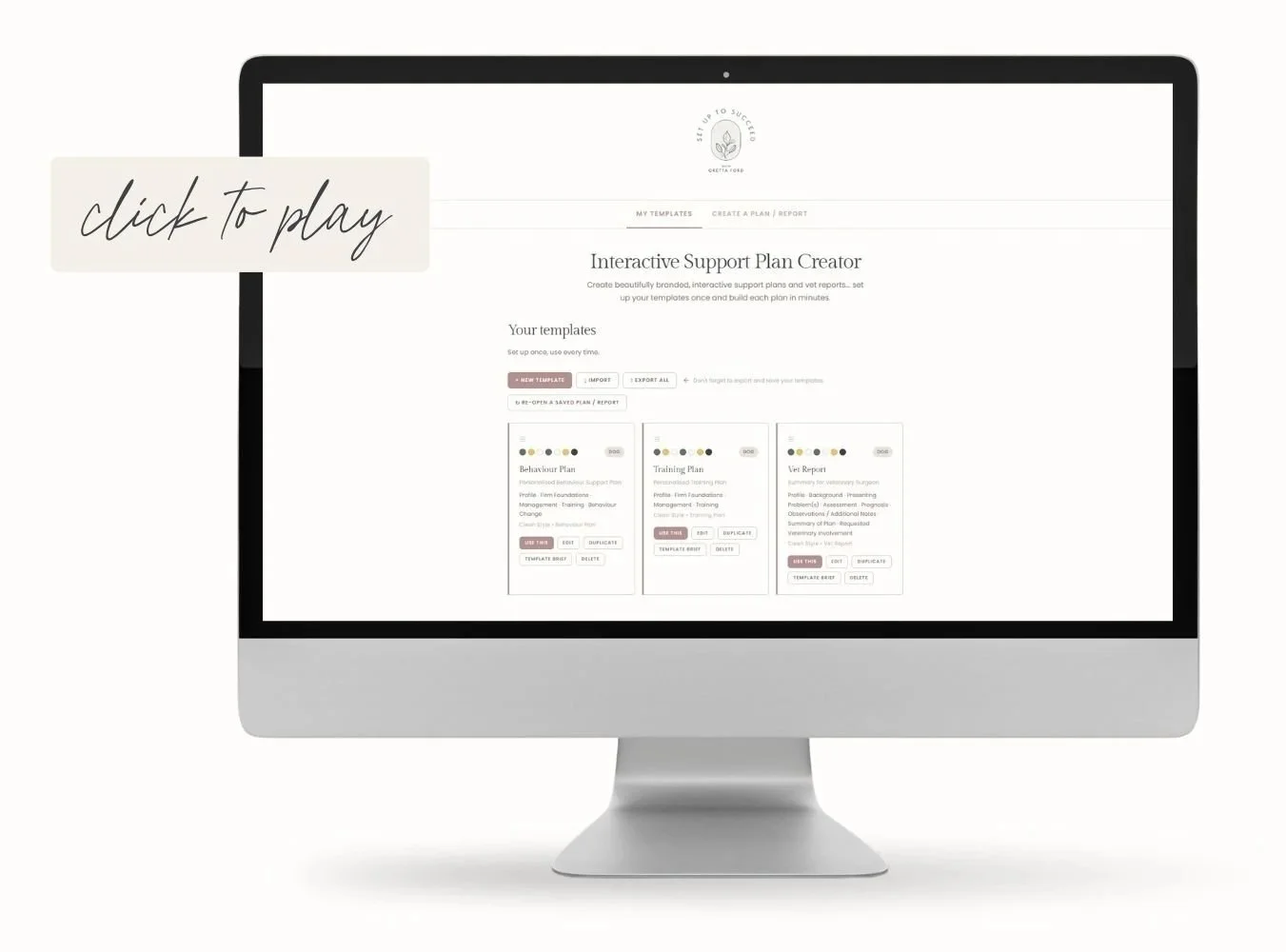
Click on the links below to view live examples:
[Note: these contain demo placeholder text, not real content].
VIEW EXAMPLE INTERACTIVE CLIENT PLAN
VIEW EXAMPLE PDF CLIENT PLAN
ViEW EXAMPLE INTERACTIVE VET REPORT
View EXAMPLE PDF VET REPORT

What’s the impact?
Here’s what makes it great…
Plans that reflect the quality of your work
Create plans that are beautifully branded (with your logo, colours and fonts) and clearly structured… without requiring design skills, a Canva subscription or an hour of fiddling to make everything sit right on the page.
Save time without compromising quality
Even if you use a Canva template, you need to tweak the presentation every time. Once you’ve set this tool up, the prettifying happens automatically. (Yes, really.) And you can create a vet report in just a few clicks!
A format that encourages client engagement
Instead of an overwhelming, multi-page PDF that gets filed and forgotten, you’ll send your clients an interactive web page that they can click to navigate, tick things off as they work through them and track their progress.

time-saving bonus resource
Pick a pathway to suit you…
The tool formats and presents your content… how you write that content is entirely up to you. But to help make it easier, I’ve included five different suggested pathways.
Whether you want to write everything out yourself, work from a session transcript or use the included AI interview prompt to question you about the case section by section, there’s an approach to fit you and your working style.
Oh and it’s probably worth noting… the tool itself does not use AI. The suggested AI-assisted pathways are just there to help you organise your thoughts and format them ready to use in the tool - the expertise and recommendations are always your own.
This is a revelation!
It has made report writing sooo much easier and speedier. I loved the previous Canva template but having the formatting automated is a dream!
CS, behaviourist


I'm Gretta Ford…
ABTC-registered Clinical Animal Behaviourist, dog trainer and the person behind Set Up To Succeed.




I've been writing training and behaviour plans (and vet reports) for over a decade. I built this tool for myself, to make them quicker to create, easier to make look great and more useful and engaging for the people receiving them.
Now, I’m sharing it with you… so that you too can create plans that do your expertise justice, without the need for design skills, yet another software subscription or extra time that you simply don't have.


one payment, INSTANT ACCESS
Client Plans… But Better
£75
✓ Interactive report for your clients to track their progress
✓ Professional PDF version for printing and saving
✓ Vet report, auto-generated from your client plan + fully editable
✓ Branded with your own logo, colours and fonts
✓ Client email template with instructions, ready to send
✓ Video tutorials and written user guide included
✓ Download and save… no subscription, no login, no platform
FAQs
If your question isn’t answered here, feel free to contact me by clicking on the chat icon in the bottom right of the page or via my contact form.
-
No… and that's very deliberate. You bring the expertise. The tool takes your content and formats and presents it professionally. There is no AI inside the tool itself: it is a structured plan builder, not a plan generator.
Some optional AI-assisted pathways are included in the workbook for getting your content together and ready to use more efficiently… but those are outside the tool, entirely your choice and at no point does AI produce your expert recommendations. That part is always yours. -
No. It's a single HTML file that you download once and open in Chrome or Edge.
Nothing to install, no account to create, no ongoing costs beyond your one-off purchase.
Works on Windows and Mac (desktop and laptop).
-
Yes, absolutely!
Obviously, the branding is fully customisable (your logo, colours, fonts, and design style), but the flexibility goes well beyond how it looks.
You decide what sections your reports contain, what they're called, and how they're described to clients. You can set up different templates for different types of work (a behaviour support plan structured one way, a training plan structured another, a vet/referral report with its own format etc.) You can have as many templates as you like.
If you work with multiple species, you can configure that too.
The vet report feature is there if you need it… and entirely ignorable if you don't.
Essentially, you set it up once to reflect how you actually work and then it just does that, every time.
-
It works on multiple browsers but Google Chrome is recommended.
It's designed for laptop or desktop use.
Your clients can view their interactive report on a mobile device…. and you can also send the PDF alongside it. -
Nowhere! The tool runs entirely in your own browser… there's no server, no database and no data sent anywhere.
Your templates and the plans you create are stored in your browser's local storage, which means they stay completely private to you. (The workbook includes guidance on backing up your templates, which is worth doing.)
Your client information never leaves your device.
-
The Canva templates are static documents you customise and edit each time.
This tool is different in two important ways:
the output is interactive (clients can tick off recommendations and track their progress in their browser) and
the formatting is handled automatically once your template is set up… so there's no more adjusting things to fit the page.
-
Yes. The species label is configurable in the template… type whatever fits your practice and it'll appear throughout the report. If you work with multiple species, you can set up separate templates for each one.
-
Technical support is available for 7 days from purchase… if something isn't working as it should, get in touch within that window and I'll help you get it sorted.
After that, the included tutorials and workbook are designed to be a self-contained resource and cover the most common questions and issues. The workbook also includes a troubleshooting section for the things that occasionally catch people out.
-
You'll receive a confirmation email with a download link for the HTML file, plus access to the video tutorials and written user guide. Everything you need to get started is there.
create PLANS THAT do your work justice